YouTube in Tamoora
YouTube for kids, with no Shorts.
Your child watches what fits their age, and you decide what, when and how long. No endless swiping, and no video that skipped your rules.
Free account · No subscription · Ages 4+
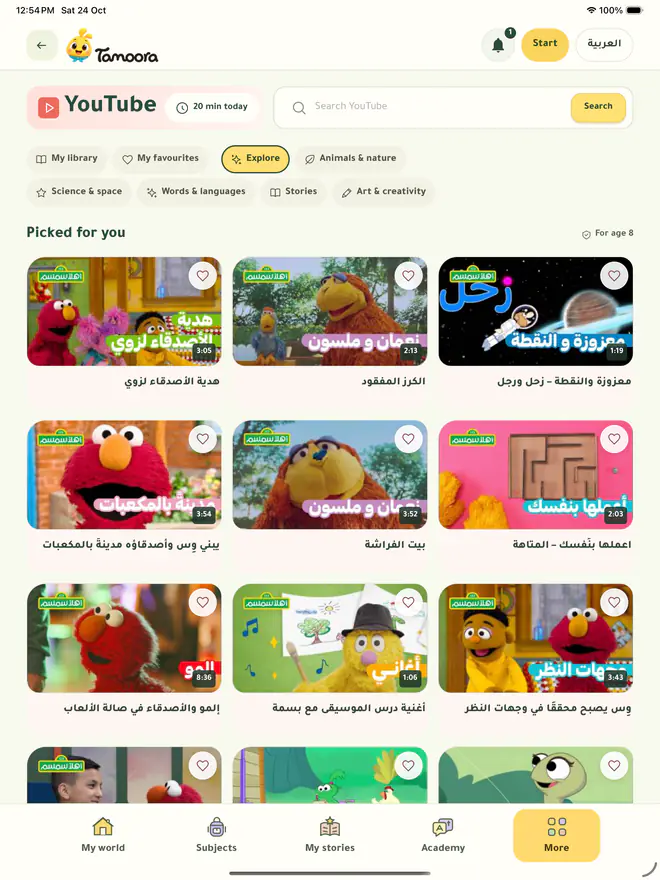
What your child sees
- No Shorts. Ever.Short vertical clips never reach your child, so the endless swipe never starts.
- Made for kids onlyVideos made for kids, with no live streams and nothing age-restricted.
- Channels for their ageChannels picked for each age, in your child’s language first, plus up to 3 of yours.
- Only your library, if you likeAdd videos by their links, and your child sees nothing else.
What you decide
- Closed until you open itYouTube stays hidden until you turn it on in the parents’ space.
- Minutes and session lengthSet the minutes a day and the length of each session, inside their daily time.
- Your blocked wordsAdd words you don’t want, and any video carrying them is left out.
- The longest videoSet the longest a single video may run.
Parents ask
Can I block YouTube Shorts for my child?
In Tamoora, Shorts never appear: your child chooses only from made-for-kids videos that Tamoora offers, from channels picked for their age or from your library, played in the official YouTube player.
How do I choose what my child watches?
In the parents’ space: open or close YouTube, add up to 3 channels, or limit watching to your own library of links, and add your blocked words.
How long can my child watch?
You set the minutes a day and each session’s length, counted inside their daily time in Tamoora.
Can my child search all of YouTube?
No. Your child chooses only from what Tamoora offers: channels for their age, your channels and your library.
More of Tamoora
A journey made for your child
Join for free, add your child, and set their time.
Free account · No subscription